📚 Role Based Access Module (RBAC)
Introduction
The RBAC module contains an abstract contract tailored for advanced permission management. It is designed to be user-friendly, flexible, and human-readable, making it well-suited for overseeing extensive and scalable systems.
This module centralizes the setting, maintenance, and adjustment of permissions within the project, prioritizing the clarity and legibility of these permissions. It offers straightforward structures related to permissions, enabling the establishment of the necessary control level over the system.
Implementation
The ARBAC contract is a centralized mechanism for managing permissioned access to restricted functions within each contract. The RBAC contract orchestrates four essential components of the system: Resource, Permission, Role, and Group (extension).
The synergy of these entities enables developers to efficiently manage access to various system components within the project.
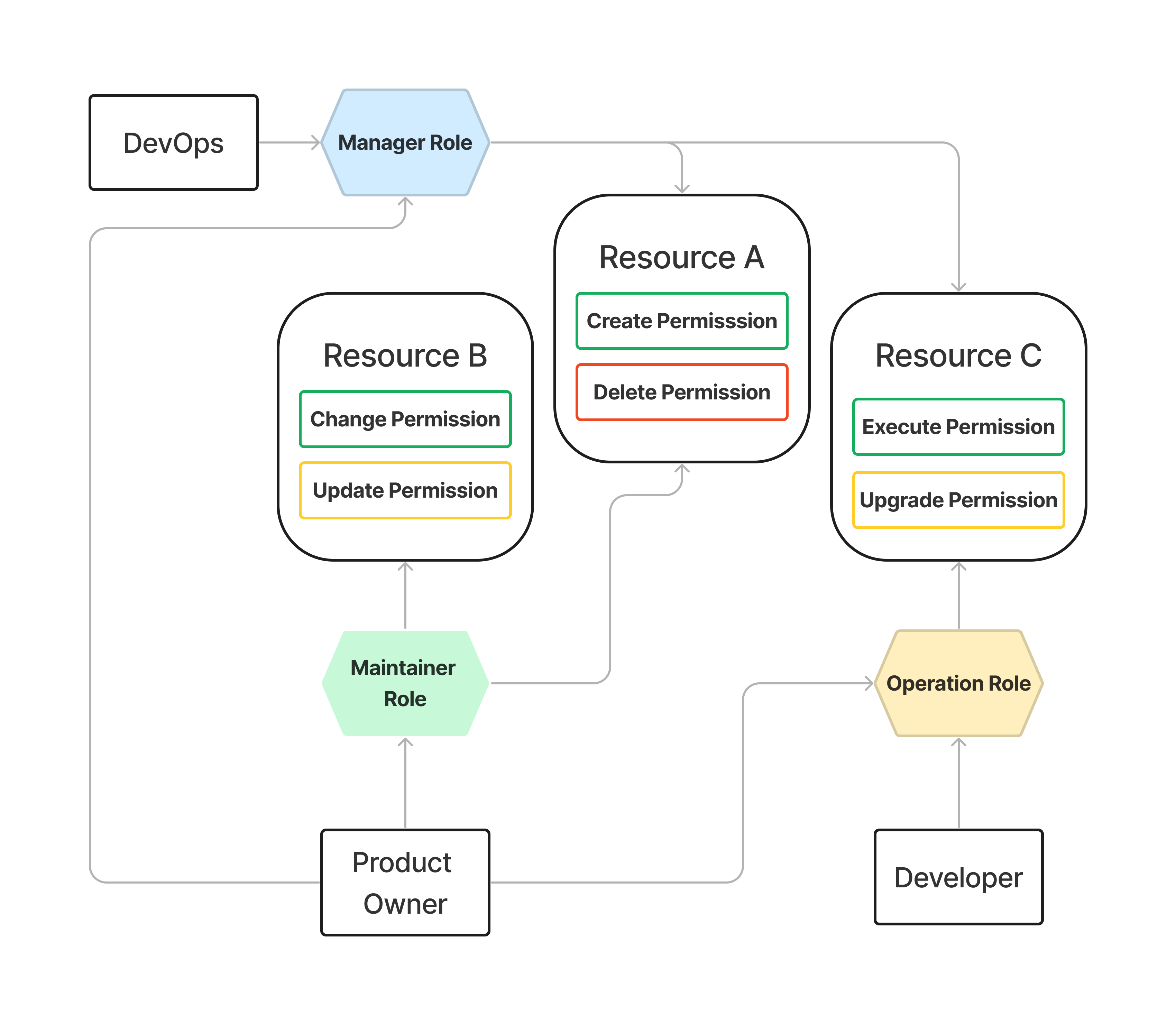
1 Permission
A Permission signifies a specific action (such as create, update, delete) that can be applied to a protected entity. It's a core component within the system, where developers specify required permissions for safeguarding particular functions.
For instance, the deposit function might be protected using the CREATE_PERMISSION, or more specifically, the DEPOSIT_PERMISSION.
Furthermore, the ARBAC module includes a default wildcard symbol *, indicating access to all Permissions.
2 Resource
A Resource represents an entity with restricted functions to which Permissions can be applied. This Resource can be manifested in various forms, such as a function, a single contract, a set of contracts, a module, etc. Essentially, it is a key element used by developers to specify what exactly constitutes a resource within the system, typically presented by the contract itself.
The wildcard symbol * can also be applied to Resource, indicating access to all Resources .
It is critical to recognize that within the system's entirety, each resource must be unique and linked to a solitary entity (such as a function, contract, or module) to prevent conflicts and potential unexpected behavior.
3 Role
The Role entity can be directly assigned to a user, which is either a contract or an EOA, encapsulating multiple Resources along with an associated set of Permissions. A user may be assigned multiple Roles.
The ARBAC contract comes with a pre-configured MASTER role. By default, the MASTER role is assigned the wildcard * for both Resources and Permissions, granting full access rights to users with this role. This default setting streamlines the initial deployment of the system by enabling the deployer account to set up the necessary components of the system with ease.
Functions for managing Roles:
| Function | Description |
|---|---|
grantRoles | Grants a set of Roles to the specified user |
revokeRoles | Revokes a set of Roles from the specified user |
addPermissionsToRole | Assigns a combination of Resource and its Permissions to a Role with an indicator to either allow or deny access |
removePermissionsFromRole | Removes a combination of Resource and its Permissions from a Role with an indicator to either allow or deny access |
4 Group (extension)
To accommodate scenarios where a group of roles needs to be assigned to multiple users, the ARBACGroupable extension is essential. It extends the ARBAC module and introduces functionalities for the administration of groups. Furthermore, there exists a default group, which is disabled by default.
If the default group is enabled, it will automatically include every user. The identifier for the default role is an empty string.
Functions for managing Group:
| Function | Description |
|---|---|
addUserToGroups | Adds a user to specified groups |
removeUserFromGroups | Removes a user from specific groups |
grantGroupRoles | Assigns a list of Roles to the specific group |
revokeGroupRoles | Removes a list of Roles from the specified group |
toggleDefaultGroup | Toggles the default group state between enabled and disabled |
Example
To set up a system, start by creating the PermissionManager contract, which is derived from ARBAC. In the beginning, no roles are granted; therefore, to facilitate further system configuration, the master role will be assigned to the specified account.
import "@solarity/solidity-lib/access-control/ARBAC.sol";
import "@solarity/solidity-lib/libs/utils/TypeCaster.sol";

contract PermissionManager is ARBAC {
    using TypeCaster for string;

    function __PermissionManager_init(address master_) external initializer {
        __ARBAC_init();
        _grantRoles(master_, MASTER_ROLE.asSingletonArray());
    }
}
Now, let's proceed to create a dependent contract that will employ the PermissionManager contract to restrict access to the deposit and withdrawAll functions, exclusive to users holding the UPDATE_PERMISSION.
By convention, the RestrictedWallet contract employs a modifier that exemplifies the UPDATE permission. When users interact with the contract, and a function necessitates authorization, the ARBAC module intervenes to verify if the msg.sender possess the requisite permissions (namely, update permission) to execute an operation on the RestrictedWallet contract. If the conditions are met, they are then authorized to deposit or withdraw funds to and from the wallet.
import "@solarity/solidity-lib/interfaces/access-control/IRBAC.sol";

contract RestrictedWallet {
    string public constant RESTRICTED_WALLET_RESOURCE = "RESTRICTED_WALLET_RESOURCE";

    string public constant UPDATE_PERMISSION = "UPDATE";

    IRBAC public permissionManager;

    mapping(address => uint256) public balances;

    modifier onlyUpdatePermission() {
        _requirePermission(UPDATE_PERMISSION);
        _;
    }

    constructor(IRBAC permissionManager_) {
        permissionManager = permissionManager_;
    }

    function deposit() external payable onlyUpdatePermission { /* ... */ }

    function withdrawAll() external onlyUpdatePermission { /* ... */ }

    function _requirePermission(string memory permission_) private view {
        require(
            permissionManager.hasPermission(
                msg.sender,
                RESTRICTED_WALLET_RESOURCE,
                permission_
            ),
            "The sender is not allowed to perform the action; access denied."
        );
    }
}
To initiate the migration process, start by deploying and initializing the PermissionManager contract. Following this, deploy the RestrictedWallet contract and initialize it with the PermissionManager contract. Once the deployment is complete, compose the wallet operator role and link the update permission to the RestrictedWallet contract's resource. Following the configuration of the role, assign the wallet operator role. The final step is to revoke the master role from the deployer account.
import "@solarity/solidity-lib/interfaces/access-control/IRBAC.sol";
import "@solarity/solidity-lib/libs/utils/TypeCaster.sol";

using TypeCaster for string;

function migration() external {
    PermissionManager permissionManager_ = new PermissionManager();
    permissionManager_.__PermissionManager_init(msg.sender);

    RestrictedWallet restrictedWallet_ = new RestrictedWallet(permissionManager_);

    string[] memory walletPermissions_ = restrictedWallet_
        .UPDATE_PERMISSION()
        .asSingletonArray();

    IRBAC.ResourceWithPermissions[] memory walletResourceWithPermissions_ =
        new IRBAC.ResourceWithPermissions[](1);

    walletResourceWithPermissions_[0] = IRBAC.ResourceWithPermissions(
        restrictedWallet_.RESTRICTED_WALLET_RESOURCE(),
        walletPermissions_
    );

    string memory walletOperatorRole_ = "WALLET_OPERATOR";

    permissionManager_.addPermissionsToRole(
        walletOperatorRole_,
        walletResourceWithPermissions_,
        true
    );

    permissionManager_.grantRoles(
        msg.sender,
        walletOperatorRole_.asSingletonArray()
    );

    permissionManager_.revokeRoles(
        msg.sender,
        permissionManager_.MASTER_ROLE().asSingletonArray()
    );
}
As we look to scale the system, we may wish to enable users in the default group to utilize the RestrictedWallet functionality. The setup remains consistent with the ARBAC module, but here we inherit from the ARBACGroupable contract and invoke the __ARBACGroupable_init function. For a straightforward initial configuration, the master role is assigned to the designated account (for instance, the deployer account).
import "@solarity/solidity-lib/access-control/extensions/ARBACGroupable.sol";
import "@solarity/solidity-lib/libs/utils/TypeCaster.sol";

contract GroupPermissionManager is ARBACGroupable {
    using TypeCaster for string;

    function __GroupPermissionManager_init(address master_) external initializer {
        __ARBACGroupable_init();
        _grantRoles(master_, MASTER_ROLE.asSingletonArray());
    }
}
The migration function is now adjusted to grant the wallet operator role not directly to a user but to the default group represented by an empty string. Once the default group is activated, all users are directly added to this group, thereby inheriting all the permissions associated with the resources that the group has (for instance, update permission on the restricted wallet resource). Ultimately, the MASTER_ROLE is revoked from the deployer account.
import "@solarity/solidity-lib/interfaces/access-control/IRBAC.sol";

import "@solarity/solidity-lib/libs/utils/TypeCaster.sol";

using TypeCaster for string;

function migration() external {
    GroupPermissionManager permissionManager_ = new GroupPermissionManager();
    permissionManager_.__GroupPermissionManager_init(msg.sender);

    RestrictedWallet restrictedWallet_ = new RestrictedWallet(permissionManager_);

    string[] memory walletPermissions_ = restrictedWallet_
        .UPDATE_PERMISSION()
        .asSingletonArray();

    IRBAC.ResourceWithPermissions[] memory walletResourceWithPermissions_ =
        new IRBAC.ResourceWithPermissions[](1);

    walletResourceWithPermissions_[0] = IRBAC.ResourceWithPermissions(
        restrictedWallet_.RESTRICTED_WALLET_RESOURCE(),
        walletPermissions_
    );

    string memory walletOperatorRole_ = "WALLET_OPERATOR";

    permissionManager_.addPermissionsToRole(
        walletOperatorRole_,
        walletResourceWithPermissions_,
        true
    );

    string memory defaultGroup_ = "";

    permissionManager_.grantGroupRoles(
        defaultGroup,
        walletOperatorRole_.asSingletonArray()
    );

    permissionManager_.toggleDefaultGroup();

    string[] memory defaultGroup_ = defaultGroup.asSingletonArray();

    permissionManager_.addUserToGroups(msg.sender, defaultGroup_);

    permissionManager_.revokeRoles(
        msg.sender,
        permissionManager_.MASTER_ROLE().asSingletonArray()
    );
}
Production References
- q-dev/q-gdk/gdk-contracts utilize the
ARBACGroupableextension for DAO operations and enhancing system scalability. - dl-tokene/core-contracts employ the
ARBACmodule for access management within the system.