🚂 Memory Vector
Introduction
Currently, Solidity does not support push and pop operations in memory arrays. This lack of functionality renders the efficient implementation of algorithms, such as filtering, unfeasible, as it necessitates calculating the exact length of the result arrays beforehand. The Vector library overcomes this limitation by providing a C++-like memory Vector data structure.
Implementation
The memory Vector in Solidity, much like Vectors in other programming languages, is designed to manage a dynamically sized collection of elements. It operates primarily on two fundamental properties: capacity and length. The capacity refers to the total amount of space that has been allocated in memory for the Vector. This is not necessarily the same as the number of elements currently stored in the Vector, which is indicated by its length. When the Vector is first created, it allocates a certain amount of memory space, determined by its initial capacity. The allocation for the Vector is performed through the Solidity's free memory pointer, ensuring that the Vector doesn't overwrite any existing important data.
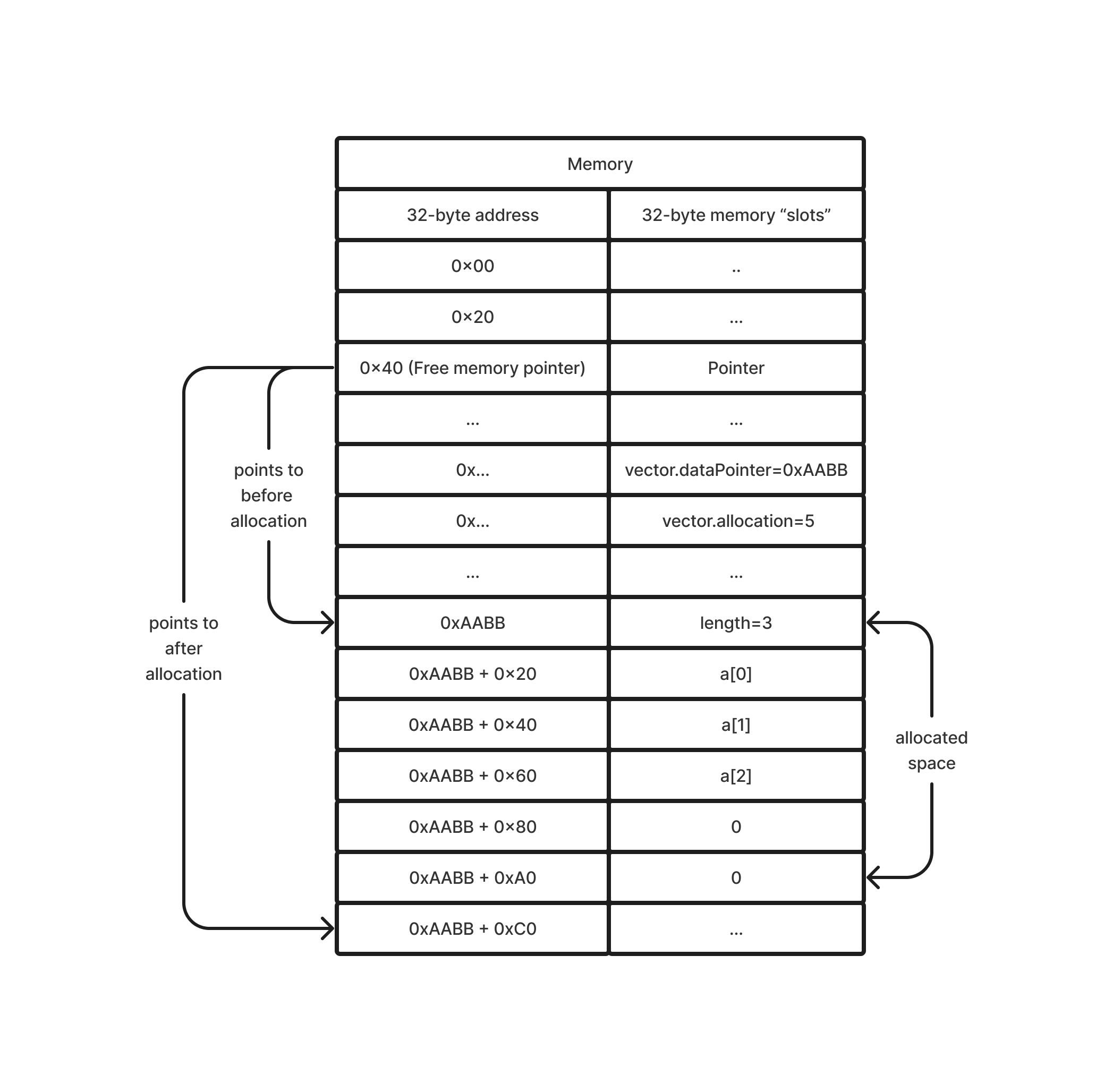
As elements are added to the Vector, it checks whether the current length is less than its capacity. If there is enough capacity, the new element is simply added to the existing memory block. This operation is efficient as it does not require additional memory allocation. However, when the length exceeds the capacity, indicating that there is no more room for new elements, the Vector needs to increase its memory allocation. It reallocates a new memory block, doubling the existing capacity. Once a larger memory block is allocated, the elements from the old block are copied over to the new block. After the copy is completed, the old memory block is considered abandoned, as memory in Solidity cannot be freed in the traditional sense.
This capacity doubling strategy is a common approach to handle growing arrays because it strikes a balance between the frequency of reallocations (which are costly operations) and memory usage efficiency. It basically means that, on average, adding an element takes constant time, making the Vector an efficient structure for a growing collection of elements. However, each individual reallocation operation, which involves copying all existing elements, can be costly in terms of gas usage. Therefore, this memory Vector is best utilized in scenarios where its dynamic resizing capabilities are necessary, but the overall number of elements and the frequency of resizing are manageable within the gas constraints. It's also important to remember that this Vector is ephemeral, existing only during the execution of a function, and does not persist across transactions.
Functions
To use the Vector library, you need to import it.
import "@solarity/solidity-lib/libs/data-structures/memory/Vector.sol";
And optionally bind it to the type with the using statement.
using Vector for Vector.UintVector;
using Vector for Vector.AddressVector;
using Vector for Vector.Bytes32Vector;
constructor
function newUint() internal pure returns (UintVector memory vector);
function newUint(
    uint256 length_
) internal pure returns (UintVector memory vector);
function newUint(
    uint256[] memory array_
) internal pure returns (UintVector memory vector);
function newBytes32() internal pure returns (Bytes32Vector memory vector);
function newBytes32(
    uint256 length_
) internal pure returns (Bytes32Vector memory vector);
function newBytes32(
    bytes32[] memory array_
) internal pure returns (Bytes32Vector memory vector);
function newAddress() internal pure returns (AddressVector memory vector);
function newAddress(
    uint256 length_
) internal pure returns (AddressVector memory vector)
function newAddress(
    address[] memory array_
) internal pure returns (AddressVector memory vector);
Description
This function is used for the Vector instantiation. It is important to use only constructors when creating vectors, as they manage the free memory pointer. Calling the constructor with no arguments creates a Vector with zero length and a capacity of 5. Otherwise, a Vector is generated with a length and capacity that match either the length_ or the array_.length.
Time complexity
The O(n), where n is a capacity.
Example
// [], length = 0, capacity = 5
Vector.UintVector memory uintVector_ = Vector.newUint();

// [bytes32(0), bytes32(0)], length = 2, capacity = 2
Vector.Bytes32Vector memory bytes32Vector_ = Vector.newBytes32(2);

address[] memory addresses_ = new address[](2);
addresses_[0] = address(1);
addresses_[1] = address(2);

// [address(1), address(2)], length = 2, capacity = 2
Vector.AddressVector memory addressVector_ = Vector.newAddress(addresses_);
push
function push(UintVector memory vector, uint256 value_) internal pure;
function push(UintVector memory vector, uint256[] memory values_) internal pure;
function push(Bytes32Vector memory vector, bytes32 value_) internal pure;
function push(Bytes32Vector memory vector, bytes32[] memory values_) internal pure;
function push(AddressVector memory vector, address value_) internal pure;
function push(AddressVector memory vector, address[] memory values_) internal pure;
Description
This function appends new elements to the vector. If there is no space left, it reallocates memory, doubling capacity.
Time complexity
Amortized O(1) when a single value_ is passed. Otherwise, it is amortized O(n), where n is the values_.length.
Example
Vector.UintVector memory uintVector_ = Vector.newUint();

uint256[] memory uints_ = new uint256[](3);
uints_[0] = 1;
uints_[1] = 2;
uints_[2] = 3;

uintVector_.push(3);      // [3],                    length = 1, capacity = 5
uintVector_.push(uints_); // [3, 1, 2, 3],           length = 4, capacity = 5
uintVector_.push(uints_); // [3, 1, 2, 3, 1, 2, 3],  length = 7, capacity = 10
pop
function pop(UintVector memory vector) internal pure;
function pop(Bytes32Vector memory vector) internal pure;
function pop(AddressVector memory vector) internal pure;
Description
This function removes the last element from the vector. It neither changes the capacity nor reallocates memory. It will revert if called on an empty vector.
Time complexity
Constant.
Example
Vector.UintVector memory uintVector_ = Vector.newUint();

uintVector_.pop() // Reverts with "Vector: empty vector"

uint256[] memory uints_ = new uint256[](6);
uints_[0] = 1;
uints_[1] = 2;
uints_[2] = 3;
uints_[3] = 4;
uints_[4] = 5;
uints_[5] = 6;

uintVector_.push(uints_); // [1, 2, 3, 4, 5, 6],  length = 6, capacity = 10
uintVector_.pop();        // [1, 2, 3, 4, 5],     length = 5, capacity = 10
set
function set(
    UintVector memory vector,
    uint256 index_,
    uint256 value_
) internal pure;
function set(
    Bytes32Vector memory vector,
    uint256 index_,
    bytes32 value_
) internal pure;
function set(
    AddressVector memory vector,
    uint256 index_,
    address value_
) internal pure;
Description
This function sets value_ to an element by its 0-based index_. It will revert if the index_ is out of bounds.
Time complexity
Constant.
Example
uint256[] memory uints_ = new uint256[](6);
uints_[0] = 1;
uints_[1] = 2;
uints_[2] = 3;

Vector.UintVector memory uintVector_ = Vector.newUint(uints_);

uintVector_.set(1, 1337); // [1, 1337, 3]
uintVector_.set(4, 1337); // Reverts with "Vector: out of bounds"
at
function at(
    UintVector memory vector,
    uint256 index_
) internal pure returns (uint256);
function at(
    Bytes32Vector memory vector,
    uint256 index_
) internal pure returns (bytes32);
function at(
    AddressVector memory vector,
    uint256 index_
) internal pure returns (address);
Description
This function returns an element by its 0-based index_. It is a read-only function. It will revert if the index_ is out of bounds.
Time complexity
Constant.
Example
uint256[] memory uints_ = new uint256[](3);
uints_[0] = 1;
uints_[1] = 2;
uints_[2] = 3;

Vector.UintVector memory uintVector_ = Vector.newUint(uints_);

uintVector_.at(1); // 2
uintVector_.at(3); // Reverts with "Vector: out of bounds"
length
function length(UintVector memory vector) internal pure returns (uint256);
function length(Bytes32Vector memory vector) internal pure returns (uint256);
function length(AddressVector memory vector) internal pure returns (uint256);
Description
This function returns the length of the vector. It's a read-only function.
Time complexity
Constant.
Example
Vector.UintVector memory uintVector_ = Vector.newUint();

uint256[] memory uints_ = new uint256[](6);
uints_[0] = 1;
uints_[1] = 2;
uints_[2] = 3;
uints_[3] = 4;
uints_[4] = 5;
uints_[5] = 6;

uintVector_.push(uints_); // [1, 2, 3, 4, 5, 6],  length = 6, capacity = 10
uintVector_.length();     // 6
toArray
function toArray(
    UintVector memory vector
) internal pure returns (uint256[] memory);
function toArray(
    Bytes32Vector memory vector
) internal pure returns (bytes32[] memory);
function toArray(
    AddressVector memory vector
) internal pure returns (address[] memory);
Description
This function returns a raw array vector based on. It's a read-only function.
Time complexity
Constant, as it's a pointer copy, not a deep copy.
Example
Vector.UintVector memory uintVector_ = Vector.newUint();

uintVector_.toArray(); // []

uint256[] memory uints_ = new uint256[](3);
uints_[0] = 1;
uints_[1] = 2;
uints_[2] = 3;

uintVector_.push(uints_);
uintVector_.toArray(); // [1, 2, 3]